Sunday, 8 July 2012

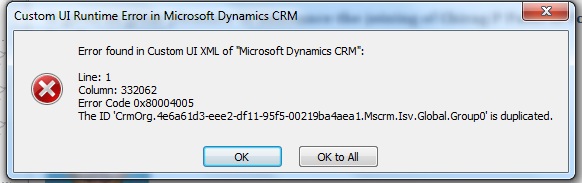
Error Found in the Custom UI XML of "Microsoft Dynamics CRM"


I got this error during outlook offline in MS CRM 2011.Ribbons were working fine in the Online mode, whereas it failed to load in outlook offline.
Later on i came to know that main cause of the error was the duplication of the  CustomAction ID which I Just copied and paste for adding a custom button on some entities.
It was working for online because in online ID's are generated  on the fly whenever the ribbon loads.But It is not the case with Outlook offline.
It happens whenever we customize Home ribbon in MS CRM 2011 .

Please go through the following blog

Hope this helps.

Regards,
Yusuf

Monday, 21 May 2012

MS CRM 2011 JavaScript common UI (User Interface) functions

I am listing some common MS CRM 2011 JavaScript UI functions.These functions are for the MS CRM 2011 User Interface.

1.Hiding a navigation Item:
 ShowOrHideNavigationItem("navContacts",false)
//====== Function to Hide navigation Item Start====== 
function ShowOrHideNavigationItem(NavItemName, ShowOrHide) 
{
    var navItem = Xrm.Page.ui.navigation.items.get(NavItemName);
    if (navItem != null)
        navItem.setVisible(ShowOrHide);
}
//====== Function to Hide navigation Item End======== 
2.Show or Hide a Control :
 ShowOrHideControl("myControlName",false)


//====== Function to Show or Hide a Control Start====== 
function ShowOrHideControl(CtrlItemName, ShowOrHide)
{
    var ctrlItem = Xrm.Page.getControl(CtrlItemName);
    if (ctrlItem != null)
        ctrlItem.setVisible(ShowOrHide);
}
//====== Function to Show or Hide Control End========
3.Enable or Disable a Control :
EnableOrDisableControl("myControlName",true)
//====== Function to Enable or Disable a Control Start====== 
function EnableOrDisableControl(CtrlItemName, EnableOrDisable)
{
    var ctrlItem = Xrm.Page.getControl(CtrlItemName);
    if (ctrlItem != null)
        ctrlItem.setDisabled(EnableOrDisable);
}
//====== Function to Enable or Disable a Control End======
4.Set a Control Required Level:
SetControlRequiredLevel("myControlName",required)
//====== Function to Set Required Level a Control Start====
function SetControlRequiredLevel(CtrlItemName, RequiredLevel)
{
    //RequiredLevel="required","none"
    var ctrlItem = Xrm.Page.getControl(CtrlItemName);
    if (ctrlItem != null)
        ctrlItem.setRequiredLevel(RequiredLevel);
}
//====== Function to Set Required Level a Control End======
5.Hide or Show a Section:
HideShowSection(1, mySectionName, false)
//====== Function to Show and Hide a section Start====== 
function HideShowSection(tabnumber, section, visible)
{
    if (Xrm.Page.ui.tabs.get(tabnumber) != null && Xrm.Page.ui.tabs.get(tabnumber).sections.get(section) != null)
        Xrm.Page.ui.tabs.get(tabnumber).sections.get(section).setVisible(visible);
}


//====== Function to Show and Hide a section End====== 
6.Hide or Show a Tab:
HideShowTab(1,false)
//====== Function to  Show and Hide a Tab Start====== 
function HideShowTab(tabnumber, visible)
{
    Xrm.Page.ui.tabs.get(tabnumber).setVisible(visible);
}
//====== Function to Show and Hide a Tab End====== 
7.Disable all the controls in a Tab:


DisableAllControlsInTab(1)
//====== Function to Disable all Controls in a Tab Start=====
function DisableAllControlsInTab(tabControlNo)
{
    var tabControl = Xrm.Page.ui.tabs.get(tabControlNo);
    if (tabControl != null) {
        Xrm.Page.ui.controls.forEach(
    function (control, index) {
        if (control.getParent().getParent() == tabControl && control.getControlType() != "subgrid") {
            control.setDisabled(true);
        }
    });
    }
}
//====== Function to Disable all Controls in a Tab End=====
8.Disable all the controls in a Section:


DisableOrEnableAllControlsInSection("sectionName",true)
//====== Function to Disable or all Controls in a Section Start=====
function DisableOrEnableAllControlsInSection(sectionControl, DisableOrEnable) 
{


    Xrm.Page.ui.controls.forEach(
    function (control, index) {
        if (control.getParent().getName() == sectionControl) {
            control.setDisabled(DisableOrEnable);
        }
    });
}
//====== Function to Disable or all Controls in a Section End=====
9.Disable the form:
//====== Function to Disable form Start=====
function DisableForm() 
{
    Xrm.Page.ui.controls.forEach(
        function (control, index) {
            if (control.getControlType() != "subgrid")
                control.setDisabled(true);
        });
}
  //====== Function to Disable form End=====
Friday, 18 May 2012

Hiding Optionset (Picklist) values based on user role in MS CRM 2011

To achieve this let's assume we have a Optionset called "my_stage".Which has some values like
1)Won
2)Lost
3)Goal shared  etc.
Based on the user role I want to hide some Optionset value.Let assume user role does not allow him  to change the stage as 'Won'.So lets hide 'Won'  from Optionset.

Let's assume you want to hide it for "MyRoleName".

1.Optionset original values


2.Get current user Role using OData functions
  var roles = GetCurrentUserRoles();
    if (roles != null) {
        for (i = 0; i < roles.length; i++) {
                     
            if (roles[i] == "MyRoleName") {
                var PickListControl = Xrm.Page.getControl("my_stage");
// Provide the value of the Optionset item need to be hide 
//(7 for "Won" in my case) 
                PickListControl.removeOption(7);
            }
        }
    }

    function GetCurrentUserRoles()
     {
        var userRoleNamesArr = null;
        var CRMContext = GetContext();
    if (CRMContext != null) 
    {
        var currentuserid = CRMContext.getUserId();

        //Creating Odata Query
        var ODataSelect = "SystemUserSet(guid'" + currentuserid + "')/systemuserroles_association?$select=Name";
        var userrolenames = GetDataUsingODataServiceWithXmlHttp(ODataSelect);
        if (userrolenames != null && userrolenames.results.length > 0) 
        {
            userRoleNamesArr = new Array();
            for (var i = 0; i < userrolenames.results.length; i++)
                userRoleNamesArr[i] = userrolenames.results[i].Name;
        }
    }
    return userRoleNamesArr;
}

//Function to get the Context
   function GetContext() 
    {
    var _context = null;
    if (typeof GetGlobalContext != "undefined")
        _context = GetGlobalContext();
    else if (typeof Xrm != "undefined")
        _context = Xrm.Page.context;
    return _context
    }

// ========== OData Service - XML HTTP Request Functions Start ==========

    function GetDataUsingODataServiceWithXmlHttp(ODataSelect) {
    var resultOfGet = null;
    var CRMContext = GetContext();
    if (CRMContext != null)
     {
        var serverUrl = CRMContext.getServerUrl();
        var ODataEndpoint = "/XRMServices/2011/OrganizationData.svc";
        try {
            var ODataURL = serverUrl + ODataEndpoint + "/" + ODataSelect;
            var service = GetXMLHttpRequest();
            if (service != null) {
                service.open("GET", ODataURL, false);
                service.setRequestHeader("X-Requested-Width", "XMLHttpRequest");
                service.setRequestHeader("Accept", "application/json, text/javascript, */*");
                service.send(null);
                if (service.statusText == "OK")
                    resultOfGet = eval('(' + service.responseText + ')').d;
                else
                    DisplayError("ODataService", "Fetch", service.statusText);
            }
        }
        catch (e) 
        {
            DisplayError("ODataService", "Fetch", e.description);
            
        }
    }
    return resultOfGet;
}

 function GetXMLHttpRequest()
  {
    try {
        if (window.XMLHttpRequest) 
        {
            return new window.XMLHttpRequest;
        }
        else
         {
            try
         { 
              return new ActiveXObject("MSXML2.XMLHTTP.3.0");
         }
            catch (ex) 
            {
                return null;
            }
        }
    } catch (e) 
    {
        DisplayError("XML Http request ", "Request", e.description);
    }
}
  function DisplayError(cntrl, func, err)
   {
    alert("Control : " + cntrl + "\n " + func + "\nError : " + err);
   }

//============== Javascript function End ================


Note :Use this javascript code on Form_onload event. It will hide the Optionset item "Won" for the role "MyRoleName". Optionset values after applying javascript.

Hope it will help You.

 Thanks,
 Yusuf

Sunday, 1 April 2012

You are attempting to create a user with a domain logon that is already used by another user

Today when I was creating a new user for testing I got this 'You are attempting to create a user with a domain logon that is already used by another user.'


Let's I was creating 'crmtrainee'

Solution:
1) Connect to CRM 2011database
2) Query 'select fullname, firstname,lastname,domainname,isdisabled,isdisabledname from filteredsystemuser where domainname like '%crmtr%' '
3) Find the record check if it is disabled (isdisabled =1).
5)If record is disabled .Go to user select disable users view, Enable them.


It solved my problem :)


Hope it helps 

Yusuf